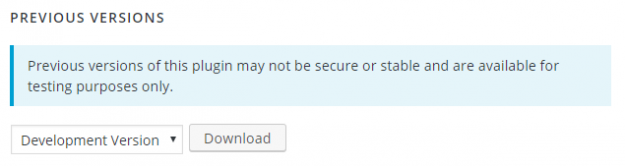
Previous versions of Contact Form 7 are all available: Go to contact-form-7/advanced Scroll to PREVIOUS VERSIONS at the bottom of the page Select your desired version from the drop-down select list. Some users report that rolling back deleted all their CF7 forms That’s never happened on any of our many sites, but to be safe…
Contact Form 7 (CF7) added support for reCAPTCHA v3 in version 5.1 following repeated requests from CF7 users. Immediately after this update, there was a large number of questions added in the CF7 Support Forum, asking for answers to problems users were experiencing with using reCAPTCHA v3 in Contact Form 7. If people are having problems…
Contact Form 7 – reCAPTCHA v2 brings the use of reCAPTCHA v2 and the [recaptcha] tag back. When you install the plugin, you need to select reCAPTCHA v2 as your reCAPTCHA version. If this plugin is installed before updating Contact Form 7 from v5.0.5 to v5.1.1, it will carry over your old API keys. Then…
Invisible reCaptcha for WordPress combines Invisible reCaptcha by Google with your WordPress site. With this plugin, you can: automatically bind the challenge to a button, programmatically bind the challenge to a button or invoke the challenge, programmatically invoke the challenge. Once you select the type of challenge, you can add it to your Contact Form…
Advanced noCaptcha and invisible Captcha brings noCaptcha or invisible Captcha in your Contact Form 7 forms. You can select whether you want a noCaptcha or an invisible Captcha for your form. Moreover, you can add multiple captcha on the same page. You can also change the theme, size and the language of your captcha. With…
No CAPTCHA reCAPTCHA simply adds the no CAPTCHA reCAPTCHA by Google to your WordPress site once you install the plugin. This plugin lets you add the Captcha in your Contact Form 7 forms easily. You can even customize the theme for your Captcha. Further, the plugin also auto-detects the language and translates the captcha to…
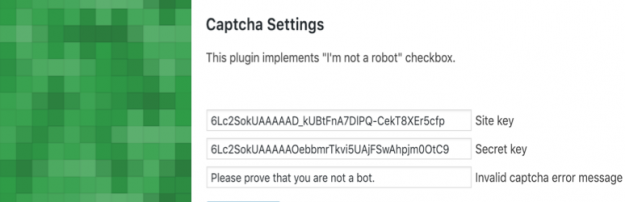
Contact Form 7 Captcha protects your Contact Form 7 forms from spam and abuse. Once you install and activate this plugin, you must add the site key and secret key in the Captcha Settings. Here, you can also customize the Invalid Captcha Error Message as you require. You can then add the captcha in your…
While the Contact Form 7 plugin is widely known by millions of WordPress users, many people may not be aware of its many useful free Contact Form 7 extensions. In this article, our aim is to make people aware of an extensive list useful Contact Form 7 extensions, what they do and how they can be used.
The Contact Form 7 (CF7) plugin successfully sends millions of emails every day. Still, many do not send or arrive. Using SMTP is one way to help overcome some of these issues. Using SMTP to send emails, can help you overcome some issues with sending and receiving emails from Contact Form 7 forms. Sending Contact…
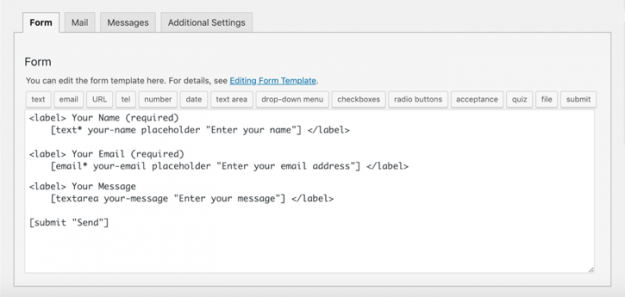
This article is about adding placeholders using the Contact Form 7 form editor. To learn about adding placeholders using the CF7 Skins Visual Editor, see Adding placeholders in your Contact Form 7 forms (with Visual Editor). . Adding placeholders to your Contact Form 7 (CF7) forms offers the following advantages: Make it easier for users to understand…