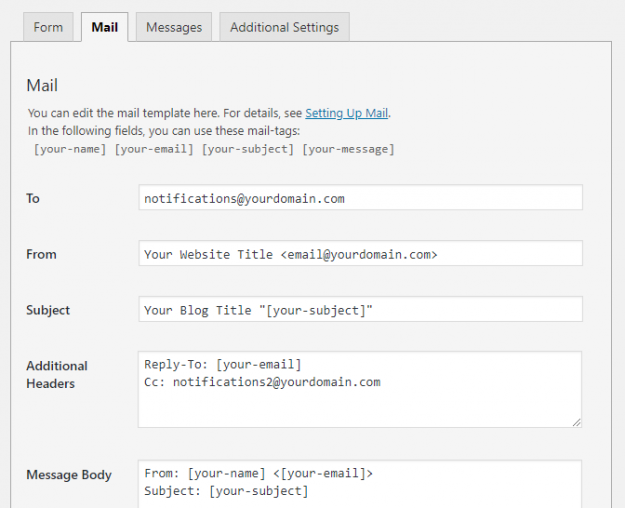
In Contact Form 7 (CF7) you need to use the Mail tab to configure the form to send an email every time your users submit a form. However, setting up mail correctly in CF7 can be confusing & difficult for beginners. In this article, we show you how to set up mail in your Contact…
Check your forms for error messages A simple way to find out whether or not your form is working is by checking the error messages. The different error messages are: 1. Green bordered success message: You receive a message with a green border when your form is submitted successfully. This message looks like: Tip: Sometimes…
Though the Contact Form 7 (CF7) plugin successfully sends millions of emails every day, there are a host of issues that can delay or stop emails on both the sending and receiving ends of a typical email. This article was set up to help people, who are having trouble sending and receiving emails from CF7,…
The Contact Form 7 (CF7) plugin successfully sends millions of emails every day. Still, many do not send or arrive. Using SMTP is one way to help overcome some of these issues. Using SMTP to send emails, can help you overcome some issues with sending and receiving emails from Contact Form 7 forms. Sending Contact…
Plugin and theme conflicts are unfortunately a fact of life with WordPress. Contact Form 7 plugs correctly into the WordPress architecture so that it does not cause conflicts with other plugins and themes. However there are many plugins and themes that are not so well written. Like many other popular plugins, CF7 is frequently reported…
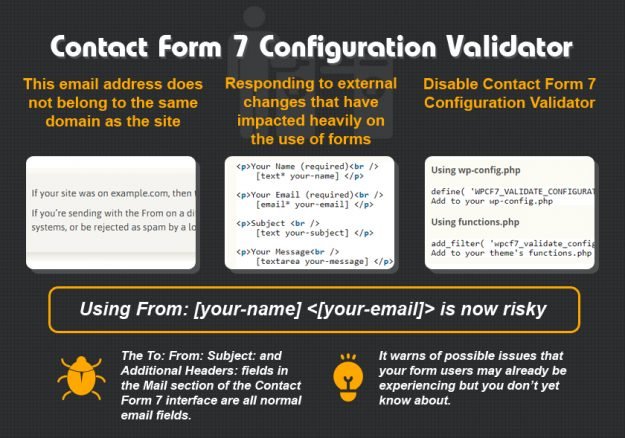
The release of Contact Form 7 – version 4.4 introduced the Configuration Validator which validates Contact Form 7 form configurations to detect errors leading to mail delivery failure or other troubles. This article explains: the expected input for each Mail setting field common mistakes how you can resolve Contact Form 7 form configuration validation errors.…
You can use Firebug or Chrome Dev Tools to try to find the cause of plugin and theme conflicts in WordPress. You will need to be skilled at using Firebug or Chrome Dev Tools to find what is causing your JavaScript conflict and how to resolve it. If that description does not fit you, you…
There is a general problem with Yahoo email addresses in Contact Form 7 forms (and lots of other applications) due to changes made by Yahoo to their DMARC security policy. In April 2014, Yahoo published a DMARC “p=reject” record, telling all receiving email servers to reject emails from yahoo.com addresses that don’t originate from a…